Showing posts with label NOKIA. Show all posts
Mobile phone-maker Nokia today announced the "beginning of a new era" for the company with the launch of four new mobile phones, including a full-screen touch-based smartphone. "Earlier this year, we outlined a comprehensive strategy to change our course," said Stephen Elop, the president and CEO of Nokia. "Innovation is at the heart of our strategy and today we took important steps to demonstrate a new pace of innovation at Nokia. It''s the beginning of a new era for Nokia," he added.


Dimensions: 116.5 mm/61.2 mm/12.1 mmDisplay size: 3.7 ”
Touch Screen: Capacitive
Camera: 8 megapixels and Dual LED flash, Geotagging
Weight: 142 g
Maximum 3G talk time: 9.5 h
Maximum 3G standby time: 335 h
Maximum music playback time: 55 h
Maximum video playback time: 6.5 h
3D Accelerometer
GPS
Supported codecs:
MPEG-4 AAC , eAAC, eAAC+
MPEG-1 audio Layer2 (MP2)
MPEG-1 audio Layer3 (MP3)
WMA 9, WMA Voice 9, WMA Lossless 9
WMA Professional 9 and 10
DRM Playready
MPEG-1 audio Layer2 (MP2)
MPEG-1 audio Layer3 (MP3)
WMA 9, WMA Voice 9, WMA Lossless 9
WMA Professional 9 and 10
DRM Playready
Audio format:
AAC
AAC+
MP3
MP4
WAV
WMA
AAC+
MP3
MP4
WAV
WMA
Video format:
WMV 9
H.264/AVC
MPEG-4
3GPP formats (H.263)
AVI
VC-1
ASF
H.264/AVC
MPEG-4
3GPP formats (H.263)
AVI
VC-1
ASF
Nokia Unveils 3 Full Touch Low Cost Asha Phones – Nokia Asha 305, Nokia Asha 306 and Nokia Asha 311
Tag :
NOKIA
Nokia has today announced three new phone models – the Nokia Asha 305, Nokia Asha 306 and Nokia Asha 311 – further expand the successful Asha family with low cost Touch screen mobile devices, taking the full touch experience to new price points.

These latest low cost phones have been designed to provide rich and smartphone-like experience to consumers who want to be set free from excessive data consumption costs and short battery life. The Nokia Asha 305, Asha 306 and Asha 311 offer a new, fully re-designed touch user interface, combining the proven ease-of-use from Nokia’s heritage with digital design innovations specifically fit for the purpose.
The beautifully crafted Nokia Asha 311 is a fast and fluid 3.5G capacitive touchscreen device, powered by a 1GHz processor to provide a great internet experience. The bright and edgy Nokia Asha 305 is a fun and affordable phone, featuring the exclusive Easy Swap dual SIM. Its sister, the Nokia Asha 306, is a single SIM model, and becomes Nokia’s most affordable Wi-Fi handset to date.
Nokia Asha 311 :
The Nokia Asha 311 is a colourful, compact touch screen device that comes with all the features you’d expect for a fun and easy mobile experience. It boasts a bright and colourful, scratch resistant capacitive glass screen with polarization filters ensuring users get the best experience from the unique and visually entertaining user interface. The Nokia Asha 311 also features a 3.2MP camera and pre-installed Nokia Maps, in addition to the 15 level pre-bundled version of Angry Birds.

The pre-loaded social client makes accessing Facebook, Twitter and many other global social networks simple while Nokia Browser makes using mobile internet fast and affordable. It also includes the most popular messaging services including “WhatsApp” a reliable and easy to use cross-platform messaging application that enables people to stay in touch with their family and friends from all around the world.
Nokia Asha 305 :

The Nokia Asha 305 is a fun and entertaining Easy Swap dual SIM phone, helping users make the most of their phone while retaining control of their costs. The phone features a bright and colorful 3″ WQVGA resistive touch screen along with Bluetooth and Dual Band connectivity. Forty EA games are available for download with every phone as well as a 2MP camera, Nokia Maps and the revolutionary Nokia Browser which helps significantly lower data costs.
Nokia Asha 306 :
The Nokia Asha 306 is the sister device to the Nokia Asha 305. Along with all the great features that come with its sister, such as bright and colorful, 3″ WQVGA resistive touch screen and 40 EA games for download – a Nokia exclusive offer, the Nokia Asha 306 also provides WLAN, enabling users to stay connected while on the move. It also supports video streaming through both GPRS and WLAN, meaning this handset truly is a fun way to stay in touch.

The estimated retail price for Nokia Asha 305 is EUR 63 and it’s expected to start shipping in the second quarter of 2012. The estimated retail price for Nokia Asha 306 is EUR 68.
The Nokia Asha 311 has an estimated retail price of EUR 92. Both devices are expected to start shipping in the third quarter of 2012. Above mentioned prices exclude taxes and subsidies.

Friends the sound is low even its full volume?
Just follow the steps.,
Just Go To
>Tools
>Settings
>Enhancement settings
>Change Enhancement from Headset to Loopset.
That's it!!

Copying Contacts from Nokia Phone to MS Outlook
Step 1:
You need to Install Nokia PC suite on your machine, if you do not have it already. Also, You need to have MS outlook or outlook express installed on your computer.
Contact your Nokia phone to your computer using data cable or Bluetooth.
Step 2: [Updated]
Go to Sync >> Sync Options.
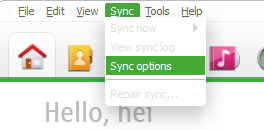
Now, click on ‘Contacts’ in the left section, and then select the option “Microsoft Outlook” (radio button) under the section “Sync with contacts application.” Now, click on OK in this window.

Step 3: [Updated]
Now, click on ‘Sync’ button for contacts in the Ovi application home. You will find this in the lower left corner when you click on the Home Tab or Contacts Tab on your Nokia softwere. If you want to sync all you data, you can click on ‘Sync All’ option which is shown in the Home tab, or you can click on ‘Contacts’ tab and this same button will change to ‘Sync Contact’ clicking on which you will be able to sync only your contacts.
[As I no longer have my Nokia 5800 with me, I have shown below a screen grab from Nokia help section.]
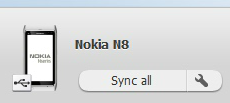
This synchronises the contacts from your Nokia with your MS outlook, this will transfer all your phone contact to MS outlook.

After you get the above confirmation message, close the Nokia PC suite, disconnect Nokia Phone from computer.
Copying Contacts from MS Outlook to iPhone
Once the Steps 1-3 are completed, all your contacts are copied to MS Outlook on your machine.
Step 4:
Connect the Apple Iphone to your computer and launch Apple itune.Click on your iPhone Device in the left tab on iTunes which will show the summary of your iPhone.
Step 5:

Click on the Info tab for your Apple iPhone.
Click on the check box for “Sync Contacts with” and leave the value selected as default i.e. Outlook. Leave the option selected as All Contacts below that. Refer to the screenshot below. (Click to enlarge)
Step 6:
Click on the Apply button.

iTunes will start syncing your Microsoft Outlook contacts on to your new iPhone and once it gets completed, you can see all your Nokia Phone contacts on your new iPhone.
And, you are done!!
You can use the same steps above to copy the contacts vice-a-versa as well, that is, from your iPhone to Nokia. Also, this can be used to transfer contacts between any other phone (which gives the option to sync with Outlook) and iphone
Hope you find this post easy and informative. How do you transfer contacts between your phone, do share with us if you have a better way of doing it.
Review for Nokia PC Suite
Nokia PC Suite is an application designed to enable Nokia phone owners to transfer important files from the mobile phone to the computer and vice versa, but also to control some of the handheld's features straight from the desktop.
The tool is supposed to provide some new functions to those who purchased a Nokia phone, including editing, backing up and synchronizing the files. Nokia PC Suite pretty much does that, as it is an easy to use application with a very pleasant and intuitive interface you should become accustomed with in a matter of minutes. All functions can be accessed from the main interface, as soon as the phone is successfully connected to the computer. There are four connectivity options available: Bluetooth, infrared, serial cable (CA-42) and USB cable, with the last one being the fastest. At times, some connection problems may occur while trying to pair the mobile phone and the computer. Also file transfer or other functions of the application could become unavailable. If this occurs, your should disconnect the devices and try to establish a new connection. The messaging function of Nokia PC Suite comes in quite handy since it allows you to write an SMS message on you computer and send it to someone in the address book. However, note that the message is not automatically transferred to the phone's “Sent” menu. The synchronization and backup features enable you to keep the important content stored on your Nokia phone safe and ready for a quick restore. You can sync notes, contacts and calendar and thus keep them up to date on both computer and mobile device. Another very useful function you will find in Nokia PC Suite is the video viewing and conversion. You can use it to turn any movie into the video format supported by your Nokia phone. Bundling a lot of powerful functions that allow you to effortlessly control and manage the content on your mobile phone, Nokia PC Suite offers a pleasant experience overall.  | |
Nokia PC Suite description | |
|

What we have today is the first picture of the upcoming Nokia Lumia 719. The phone is destined for the Asian and American markets and as can be deduced from the name will be placed above the current NOKIA LUMIA 719


The Lumia 719 has a very basic design. Although it’s hard to tell, the phone seems to be much thinner than the Lumia 710 and keeps the physical keys below the display. The phone is said to have a 3.7-inch, AMOLED display with Nokia’s Clear Black technology, 5 megapixel camera and HD video recording, the last two being par for the course for a Windows Phone device.
We are expecting the device to be officially announced in China on March 28, which is when Nokia will be holding its Lumia event there.


